# dbt starter guide
## WHAT IS DBT?
{% hint style="info" %}
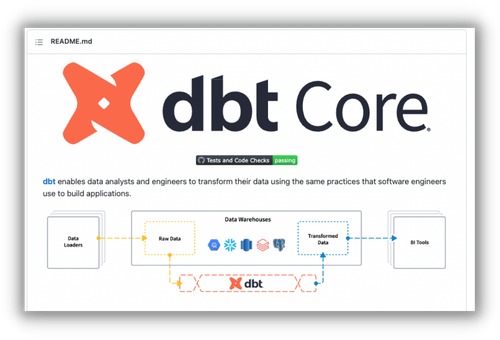
[dbt is a code-based data transformation tool designed for the modern age of data.](#user-content-fn-1)[^1]
{% endhint %}
In traditional data pipelines, the data transformation step is usually handled with drag/drop tools and an "ETL" pipeline optimized for row-based databases.
However, the advances in cloud computing and the growing expectations of data teams has forced us all to rethink the way we approach this entire process.
Version control & automation is a must, data quality is more important than ever and data is now treated like a standalone product rather than an after thought.
{% hint style="info" %}
*dbt allows you to create data transformation logic using SQL* but in a way that can be incredibly dynamic.
{% endhint %}
This is accomplished by using features like Jinja templating and yaml-based config files.
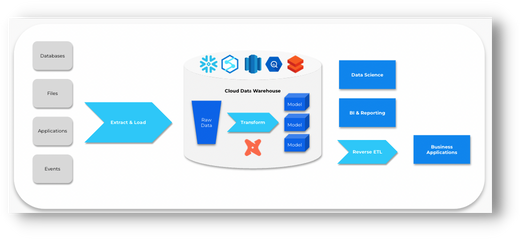
At a high level, dbt uses these features to compile SQL queries which are then sent to your cloud database server to be executed. All of this happens within a single "run".
The result is new, transformed data models (tables, views) that are ready for analytics.
You can also add tests, create a documentation website and automate the entire process with just a few simple commands.
This is just scratching the surface and there are many subtleties that are outside the scope of this starter guide.
But what about all of this has made dbt skyrocket in popularity?
### WHY IS IT SO POPULAR?
*Functionality plus an opinionated approach solve data workflow problems.*
We know that data now needs to be managed like a standalone product.
But even if that makes sense at a high level, it's hard to just start changing things without the right processes and tools in place. Not to mention this is a new thought process for most data folks and there are many questions around best practices.
## 5 BEST PRACTICES TO CONSIDER
{% hint style="info" %}
*A breakdown of common scenarios and approaches for optimizing dbt.*
{% endhint %}
### TIP #1: USE CTES
{% hint style="info" %}
*CTEs (Common Table Expressions) are treated as passthroughs*
{% endhint %}
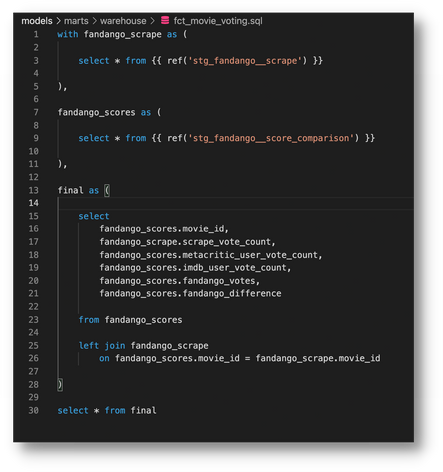
At the end of the day, all dbt “models” are ultimately just SQL statements. And traditionally, one would think that a select \* from anything is a bad idea - but not so fast.
Modern cloud databases are really smart and treat CTEs as pass-throughs. They only care about the columns you select at the very end and will disregard all others completely.
For that reason, it is suggested to use CTE’s as "imports" and to overall organize your code.
For example, a typical dbt model might look something like this:
For more on this topic, check out [this article](https://discourse.getdbt.com/t/ctes-are-passthroughs-some-research/155).
### TIP #2: CREATE A STYLE GUIDE
{% hint style="info" %}
*Consistency will make or break a project*
{% endhint %}
Anytime you get into a group, you’re bound to have different approaches. This is not necessarily a bad thing, but it makes consistency hard to achieve.
The best way to combat this is to get everyone on the same page from the start. A great way to do this is to create a style guide for your project.
This should include things like how you plan to name your models *(e.g. prefixes, plural vs singular)*, how you will name columns *(e.g. snake vs camel case, is\_ for boolean)* or how you're write your queries *(e.g. all lowercase, line length limits)*.
More specifically, you should create a separate .md file just for your style guide and reference it from your main README.md for others to easily find.
Check out [this example](https://github.com/dbt-labs/corp/blob/main/dbt_style_guide.md) style guide from dbt to get you started.
### TIP #3: LEVERAGE DIRECTORIES
{% hint style="info" %}
*Remember DRY (dont-repeat-yourself)*
{% endhint %}
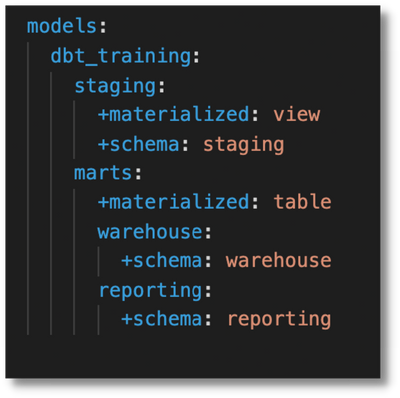
Dbt is designed for modularity and reusability. One of the best ways you can take advantage of this is through directories.
First, it will it help you organize your project. But more importantly, it will allow you to set directory-level model configurations in your dbt\_project.yml file rather than repeating the same configuration in each individual model. Just imagine if you had 100s of them.
The further down in directory layers you go, the more it will take precedence until you finally get to the model itself.
Set things that are reusable at the highest level, and only add new configs as you move further down. However, avoid creating model-specific configs in your dbt\_project.yml if possible to avoid over-cluttering it.
For more on model configurations, check out [this link](https://docs.getdbt.com/reference/model-configs).
### TIP #4: AUTOMATE TESTING
{% hint style="info" %}
*We're developers, not full-time testers*
{% endhint %}
However...testing is a critical part in creating trust in the final data product. Fortunately, dbt is a command line tool and can be easily automated.
Once you’ve created your tests *(singular/generic)* in your project, you can use automations like GitHub Actions or GitLab Pipelines to automatically test your code before it gets too far.
For example, every time a new pull/merge request is opened, you can set a workflow to:
1. Deploy your dbt models (dbt run)
2. Test your data (dbt test)
Any failures would block the merge. While nothing is 100% bullet proof, this will allow you to catch obvious errors right away in an automated fashion. The more robust your test suite gets, the better this process will be.
Learn more about [GitHub Actions](https://github.com/features/actions) and [GitLab Pipelines](https://about.gitlab.com/blog/2019/07/12/guide-to-ci-cd-pipelines/)
### TIP #5: DON'T HARDCODE TABLES
{% hint style="info" %}
*This works against core dbt functionality*
{% endhint %}
It might be second nature to write out your table names in a SQL query, but you’ll want to avoid this at all costs with dbt.
Technically it will still work, but this approach will cause you to miss many of the best features of dbt. Instead, you should always refer to a table in your models by using either the “source” or “ref” Jinja functions.
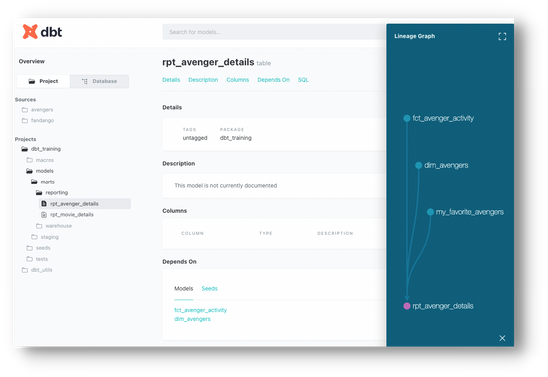
Why? First, using these functions will allow dbt to create dependencies between your sources and models which in turn allows it to create a proper DAG. This means you can easily run any upstream/downstream models using simple [operators](https://docs.getdbt.com/reference/node-selection/graph-operators).
Second, it will automatically set the correct database/schema when running your project in different [environments](https://docs.getdbt.com/docs/guides/managing-environments). If it’s hardcoded, you’ll be stuck with the same one and your code will be much less dynamic.
### BONUS: HOST DOCUMENTATION
{% hint style="info" %}
*Give your stakeholders what they want*
{% endhint %}
Stakeholders love data dictionaries, and dbt allows you to easily create a pre-built website through two simple commands:
1. dbt docs generate
2. dbt docs serve
However, you’re going to want to find a convenient way for people to access it. You could always keep it on a network server and give people access. But another option is to push it to a hosted provider.
For example, use your cloud provider or a static web hosting service like [Netlify](https://www.netlify.com/) or [Github Pages](https://pages.github.com/).
You can even add a step in your automated workflow (tip 4) to publish the latest version of your docs to one of these locations.
Once that’s set up, you can set it and forget it and direct 99% of stakeholder questions to the site.
### 10-PART CHECKLIST
Once you’ve initialized a brand new dbt project, it is a feeling of both excitement and intimidation.
The freedom of open source is every developer's dream but unless you’ve worked with dbt before there’s a good chance you’ll overlook something subtle.
Use this checklist to help you feel more comfortable that you’ve set the proper foundations for your project and can get off to a great start!
#### The List
1. Create a style guide
1. Add it directly in your project or link to it from your readme.md file 2. Determine high-level model/ directory structure
2. [Here is a link](https://docs.getdbt.com/guides/best-practices/how-we-structure/1-guide-overview) to a helpful breakdown of a common way to structure it
3. You'll typically want to match it closely with your database structure
4. Create a request template on your hosted git provider for pull/merge requests
1. This will facilitate your review process and help you catch errors ahead of time
2. [Here is a video](https://youtu.be/MjsS4ujX3nU) where I show you how to do this for GitHub
5. Set default values as [variables](https://youtu.be/mtore826Ovs) in dbt\_project.yml
1. This avoids the need to hard-code the same values in different places (DRY)
6. Review packages on [dbt hub](https://hub.getdbt.com/) to avoid reinventing the wheel
1. A great place to start is dbt-utils
2. At the very least, you can use packages for inspiration to create your own macros 6. Implement [hooks](https://youtu.be/8n-JFq8Uj9c) for repetitive tasks
7. Common examples are for auditing, inserts/updates, permissions, etc.
8. You can also create and use macros as hooks instead of putting SQL directly
9. Decide on commit message & branch naming conventions
1. Helpful for auditing
2. An example template is \[task-number]-devInitials-description i. \[JIRA-1234]-mk-create-a-staging-model
10. Update & make use of [model config section](https://docs.getdbt.com/reference/model-configs) in dbt\_project.yml
1. Assign any reusable configs in this section
11. Decide if you’ll do one yaml file (schema) per directory or one per model
1. This will depend on the scope of your documentation and testing
2. If unsure, start with one per directory and move to individual if it gets too long
12. Join the [dbt Slack Community](https://www.getdbt.com/community/) (it's free!)
For more dbt-specific content, check out this [YouTube playlist](https://youtube.com/playlist?list=PLy4OcwImJzBLJzLYxpxaPUmCWp8j1esvT).
[^1]: